
Arrow Functions in JavaScript: A Simpler Way to Write Functions
What is a function?
Before moving on to the arrow functions, Let us understand what a function is.
A function is just a reusable block of instructions packed together.
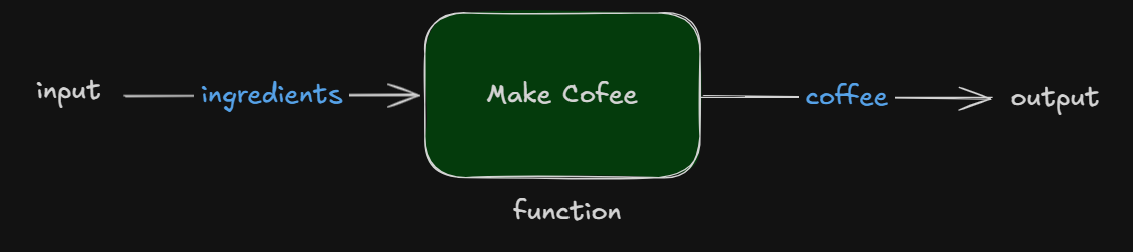
Function may take some input, process it, and may return some output.
Example - Making Coffee
I have a coffee machine and I want to make a coffee. So I need to follow the steps:
Add the required ingredients inside the coffee machine.
Start the Machine
Get the hot coffee
What is arrow function?
Arrow function is just a shorter syntax to write functions in JavaScript. There is not difference in the work that our normal function does, it behaves the same, just a difference of syntax.
Syntax - Regular Function
//function body
function function_name(parameters) {
    //code block
}

//function call
function_name(arguments);
Syntax - Arrow Function
//function body
const function_name = (parameters) => {
    //code block
}

//function call
function_name();
Difference b/w arrow function and Regular function
There are very few differences:
| 🔎 Feature | 🧩 Regular Function | ⚡ Arrow Function |
|---|---|---|
| Syntax | Uses function keyword |
Does not use function keyword |
| Implicit Return | ❌ Not supported (must use return) |
✅ Supported (when {} are removed) |
this Keyword |
Has its own this |
❌ Does not have its own this (lexically inherited) |
arguments Object |
Available | ❌ Not available |
| Hoisting | ✅ Function declarations are hoisted | ❌ Not hoisted (stored in variable) |
| Best Used For | Object methods, constructors | Callbacks, short functions |
| this | this is binded where function is called not where it is defined | this is binded where the arrow function is defined, no matter where it is called |
| Binding | this can be explicitly binded using call, apply and bind | this cannot be explicitly binded in arrow functions |
Deep dive on arrow function syntax
Arrow functions with one parameter
If our function is having only one parameter then, parenthesis are optional.
//with parenthesis
const greet1 = (name) => {
    console.log('Welcome ', name);
}

//without parenthesis
const greet2 = name => {
    console.log('Welcome ', name);
}
Arrow functions with multiple parameters
If our function is having multiple parameters then it becomes compulsory to use the parenthesis. There are optional in case of 1 parameter only.
const greet = (first_name, last_name) => {
    console.log('Welcome ', first_name+last_name);
}
Implicit return vs explicit return
When there is only one line of code in our function body which is a return value, then the return keyword is optional, and curly braces are also optional.
It will look like a one liner code.
//implicit return
const greet = name => 'Welcome '+ name

//explicit return
const greet = name => {return 'Welcome '+ name}
Returning object in one line
If we want to return object in one line, then we need to use parenthesis because curly braces will be treated as function body curly braces.
//with return keyword
const convertArgToObject1 = name => {return {name}}

//without return keyword
const convertArgToObject2 = name => ({name})


